
NV Casino Registration and Login Procedures for the European Market
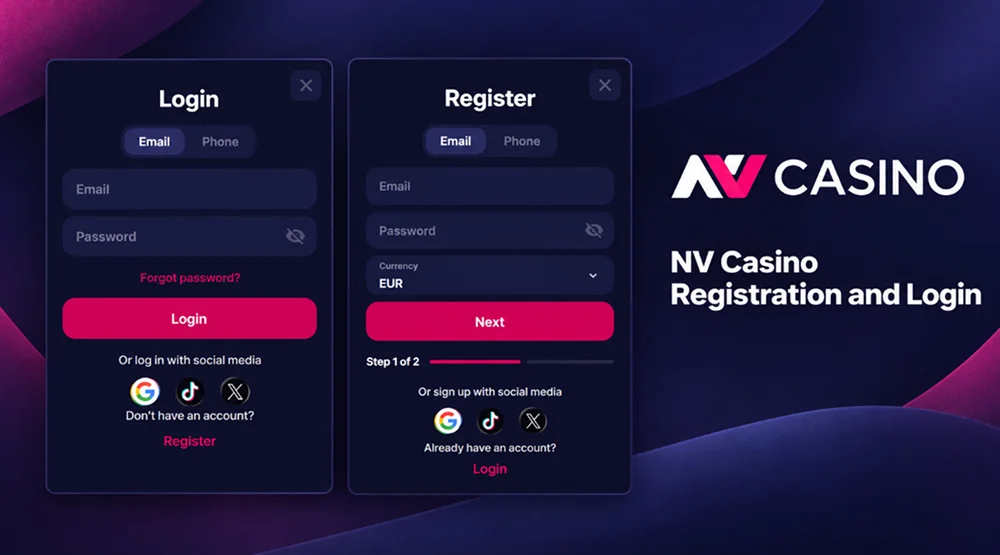
NV Casino registration turns the public game catalogue into a personal area where real-money play becomes available. After opening a profile, the customer can add funds and request payouts through the casino cashier. Promotions intended for registered members can also be activated from this area.
Account progress does not disappear when the session ends. The NV Casino account records completed bets, active bonus conditions, tournament results and the current VIP level. The customer can therefore continue from another browser or mobile device without starting again.
The profile also gives direct control over account limits and communication settings. When access must be restored or a payment needs to be checked, support can identify the customer through the registered details and review the relevant transaction. Verification connects the profile with its legitimate owner and protects it from unauthorised use.
Creating a New Player Account
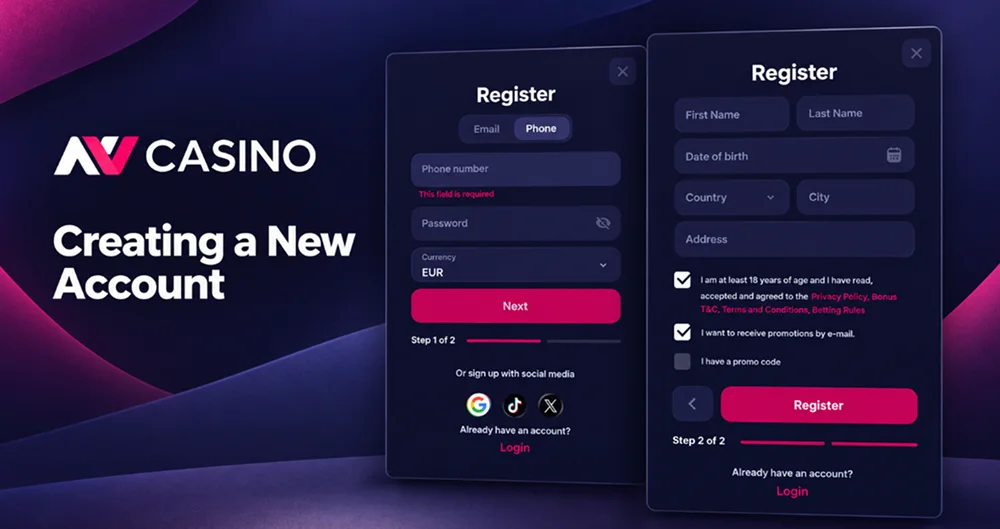
The NV Casino register button opens a form marked Step 1 of 2. The first stage establishes the login method, while the remaining fields record the personal information required for the casino profile. Registration is available only to adults who have reached the legal gambling age in their country of residence.
Use the following order to open a profile:
- Open the official NV Casino sign up page. Check the address before entering contact details. Copies of the registration page may use a similar logo or colour scheme.
- Press Register. The form appears over the current page, so there is no need to leave the casino lobby. Customers who already have a profile should select Login instead.
- Choose the registration method. An email address and password create a direct login. Google, TikTok and X appear as alternative social options in the current form.
- Enter the requested personal details. The information must describe the person who will use the profile and make payments. Initials, nicknames and another person’s telephone number should not replace legal information.
- Review the casino rules and privacy notice. Registration confirms acceptance of the applicable conditions. Marketing consent should be treated as a different choice from acceptance of the rules required to use the service.
- Complete the second stage and open the profile. The profile area then records account status, bonuses, deposits, withdrawals and betting history. Any missing information can be requested before a payment or withdrawal is processed.
The country entered during NV Casino registration affects available games, promotions and payment services. Enter the actual place of residence rather than choosing another location to unlock a restricted product. A later mismatch between the profile, IP address and verification documents may require an additional review.
NV Casino Sign-Up via Social Media
Google, TikTok and X are displayed as social registration and login methods. Selecting one of these buttons opens the authorisation process controlled by the chosen service. The customer confirms access there and then returns to NV Casino to provide any information that the social profile did not supply.
Social registration changes the sign-in method but does not remove casino requirements. We can still request a legal name, date of birth, address, telephone number and identity documents. A social username or profile photograph cannot replace KYC information.
Before choosing this route, check three points:
- The social profile must belong to the person opening the casino account.
- Access to its email address, telephone number and recovery settings should remain current.
- The same social service should be selected during future NV Casino logins.
Pressing Google during sign-up and later trying to enter through X will not open the original profile. Do not register again when the expected profile fails to appear. Sign out, return to the login window and choose the social provider used the first time.
Identity Verification Requirements
NV Casino verification confirms the account holder’s age, personal details and ownership of payment methods. It also supports anti-money laundering controls and checks against fraud, duplicate profiles and prohibited third-party payments. Registration and verification are related but do not always occur at the same time.
Standard KYC can begin when the total value of transactions reaches or exceeds €1,000 or $1,000. We may also request it earlier when account activity presents a higher risk, information does not match or a compliance review is required. Verification can therefore occur before a withdrawal even when the threshold has not been reached.
The first KYC screen asks the customer to centre their face within the displayed frame. Personal fields then collect the first name, last name, gender, birth date, country, city, address and telephone number. This information should match both the profile and the documents that follow.
A verification request may result from:
- Reaching the transaction threshold stated in the KYC policy.
- A mismatch between personal, payment or location information.
- Several payment instruments were used within a short period.
- Access from devices or networks also associated with other profiles.
- Activity that requires a source-of-funds or source-of-wealth check.
- A routine compliance decision based on the circumstances of the account.
Submit photographs without filters, cropping or digital alteration. Every required edge and detail should remain readable. If the system rejects a clear document, contact support before sending unrelated files.
NV Casino Login and Account Access
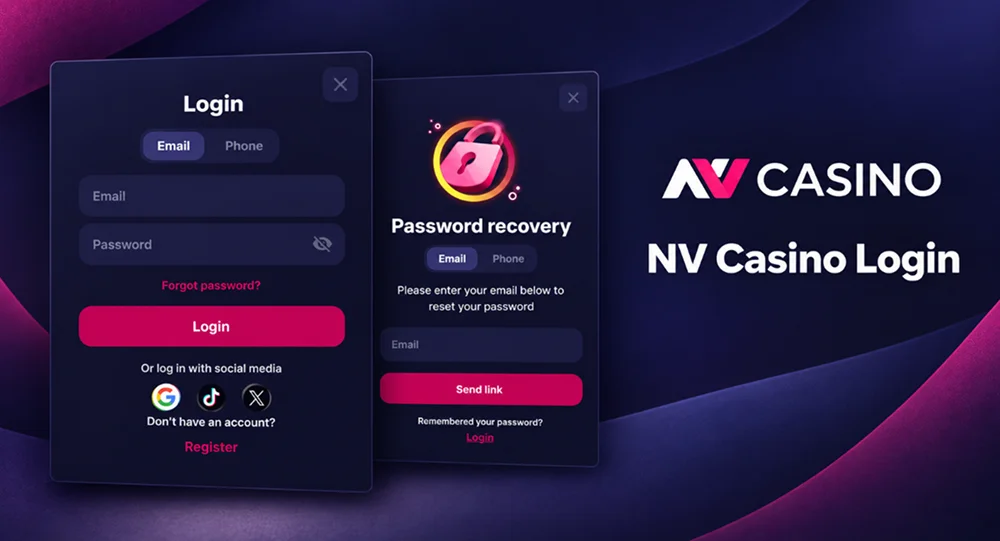
Returning customers open the Login window and choose either Email or Phone. The selected contact detail and the account password must then be entered in the corresponding fields. Google, TikTok and X remain available below the standard login form for profiles created through those services.
A failed login does not always indicate an account restriction. Check the selected tab and the spelling of the credentials before requesting help. Email login will not accept a telephone number, while telephone login may require the full country code.
Common causes of an unsuccessful attempt include:
- Entering the social profile email into the standard email form when the account was created through a social button.
- Using an old telephone number that is no longer connected to the profile.
- Adding a space before or after an email address copied from another application.
- Entering the password with the wrong keyboard language or capitalisation.
- Opening a saved link that does not lead to the official NV Casino domain.
- Repeating incorrect attempts instead of using password recovery.
After NV Casino sign in, the profile menu displays the customer’s current status and points. Tabs lead to the profile, bonuses, deposits, withdrawals and betting history. Available cashback and promotional offers are also shown in this area.
End the session after using a shared computer or telephone. Closing only the game window may leave the casino profile active in the browser. Saved passwords should not be enabled on a device used by several people.
Password Recovery Options
The Forgot Password? control appears below the password field. Use it when the password is unknown rather than testing several possible combinations. Recovery instructions are sent through the contact channel connected to the profile.
Complete the reset in this order:
- Open the official NV Casino login window.
- Select Forgot Password?
- Enter the registered email address or telephone number requested by the form.
- Open the recovery message and follow its current instruction.
- Create a new password that has not been used for the same profile before.
- Return to the login page and enter the new credentials.
Check the spam folder when an expected email does not arrive. Telephone recovery also requires an active number with the correct country code. Do not request repeated messages in rapid succession because only the most recent recovery instruction may remain valid.
NV Casino support does not need the customer’s complete password. Do not send passwords, recovery codes or social media credentials through live chat or email. When the registered contact channel is no longer accessible, support may request identity information before changing it.
FAQ
Check the spam, promotions and blocked-sender folders first. Confirm that the address was entered correctly and that the mailbox has enough free storage. When requesting a new recovery message, use only the latest link because an earlier one may no longer work.
Contact support before the old email address or telephone number becomes unavailable. A change to login details may require an ownership check, especially when the profile already contains payments or completed bets. Do not create a replacement account with the new contact information.
Yes, but a new device or location may trigger an additional security check. Use the existing NV Casino online login details and complete any confirmation shown on the screen. Creating another registration is unnecessary when changing a telephone, computer or browser.
A VPN or proxy can create a conflict between the customer’s stated residence and detected location. This may interrupt registration, restrict available services or trigger an account review. Use a normal connection that shows the actual country from which the account is accessed.